iPhone 17 Case Canva Templates: Design, Print & Sell with Ease
Creating a custom phone case used to require expensive software, specialized skills, and a lot of trial and error. Today, that process is dramatically simpler. With the right iPhone 17 case Canva templates, anyone with a creative idea and a Canva account can design professional-looking cases ready for sublimation printing or digital mockups. This isn't just about convenience; it's about unlocking a real opportunity for personal projects and small business ventures alike.
What Exactly Are These iPhone 17 Case Canva Templates?
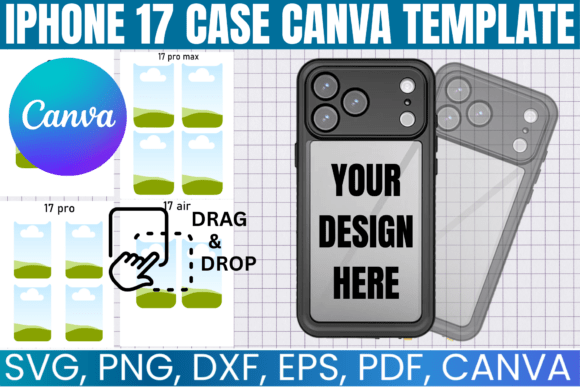
Think of these templates as your digital design foundation. They are precisely measured, layered files that match the exact dimensions and camera cutouts for the upcoming iPhone 17 lineup. This bundle typically includes separate templates for the standard iPhone 17, the iPhone 17 Pro, the larger iPhone 17 Pro Max, and the rumored iPhone 17 Air. Each file is built to ensure your artwork, patterns, or photographs wrap perfectly around the case, accounting for the side edges and any specific model contours.
The real power lies in their compatibility and ease of use. Delivered in multiple formats like SVG, PNG, PDF, EPS, and DXF, they integrate seamlessly with your favorite tools. The included Canva link is particularly valuable, offering a true drag-and-drop experience. You simply open the template in Canva, place your graphics onto the designated layer, adjust colors, add text, and see your design come to life instantly. For those using cutting machines or professional design software, the vector formats provide infinite scalability and precision.
From Idea to Finished Product: A Practical Workflow
The journey from concept to a physical or mockup product is straightforward. After purchasing, you receive instant access to the download files. The key is to open the provided PDF, which contains the direct link to the editable Canva template. Once in Canva, you can upload your own images, use Canva's vast library of elements, or import designs from other programs. The template acts as a safe boundary, showing you exactly where the design will be visible and where it will wrap around the edges.
For sublimation printing, you would design within the template, then export the file as a high-resolution PNG. This file is then printed onto sublimation paper using a sublimation printer and heat-pressed onto a compatible blank phone case. The result is a vibrant, durable, full-wrap design that won't peel or fade. For digital creators, the process is even simpler: use the template to create stunning mockups for your online store, social media, or client presentations. Place your design into the template, add a realistic background, and you have a professional product image in minutes.
Who Stands to Benefit Most?
The applications are broad, but the value is most tangible for specific groups. Small business owners and entrepreneurs can use these templates to rapidly prototype and sell custom phone cases without holding inventory, using print-on-demand services. Graphic designers and marketers can create branded merchandise or client gifts that reinforce a brand identity. Crafters and hobbyists gain the ability to produce personalized gifts for friends and family with a professional finish.
For those in the digital space, these are essential design assets. Bloggers and content creators can generate unique product imagery. Etsy sellers and digital product creators can expand their offerings with customizable phone case designs or sell the templates themselves as part of a digital kit. The key advantage is the removal of technical barriers. You don't need to master complex vector software to start; Canva's intuitive interface makes the design process accessible, while the file formats ensure professional-grade output for those who need it.
Making the Most of Your Template: Design Considerations
A great template is a starting point, not a guarantee of a great design. To create something truly compelling, consider a few principles. First, think about visual hierarchy. What is the focal point of your case design? Is it a central image, a bold pattern, or a clever typographic statement? Use the template's layers to separate background elements from foreground graphics. This mimics professional editorial design and packaging design practices.
Second, consider the medium. Sublimation on a phone case has specific characteristics. Colors appear vibrant, but extremely fine details might get lost on textured case surfaces. Test your design at actual size to check readability, especially for small text. This is where the template's precision pays off. Finally, think about your audience. A design for a tech enthusiast might lean into clean, modern typography and minimalist geometry. A gift for a friend might use a script font or handwritten font for a personal touch. The template accommodates all these styles, but your creative direction determines the outcome.
Key Features That Make This Bundle Stand Out
Not all template packs are created equal. This one is built with practical use in mind. The inclusion of all iPhone 17 models future-proofs your designs. The multi-format file support (SVG, PNG, PDF, EPS, DXF) ensures you're never locked into one piece of software. You can start in Canva for speed and ease, then take the SVG file into Adobe Illustrator or Cricut Design Space for more advanced manipulation if needed.
The licensing is also crucial for commercial users. These templates are typically licensed for both personal and commercial use in creating finished products. This means you can legally sell the physical cases or digital mockups you create using them. However, you cannot resell or redistribute the template files themselves. Understanding this distinction is vital for any small business. The commercial font and asset licensing here is clear and permissive for the end product.
Ultimately, these iPhone 17 case Canva templates are more than just files. They are a bridge between your creativity and a tangible, market-ready product. They streamline the technical workflow, uphold professional standards with accurate dimensions, and provide the flexibility to work within your preferred design ecosystem. Whether you're crafting a single personalized gift or building a product line, they offer a reliable and efficient foundation to bring your ideas to the palm of someone's hand.